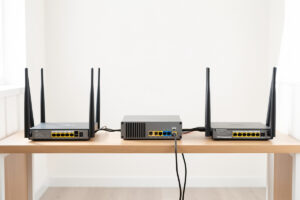
No — running two internet connections through a load balancer does not double the speed of a single download: two 100 Mbps lines still deliver 100 Mbps to any one download, not 200. Load balancing spreads separate connections across your two lines, so one device’s big download still rides one link at that link’s native speed. What you gain is aggregate capacity for the whole household at once, not a faster single transfer. Understanding why comes down to one idea: load balancing works on sessions, not packets.
This is the most common misunderstanding in all of multi-WAN, and it costs people real money. Someone reads a headline promising “double your internet speed,” pays for a second line, runs a speed test expecting 200 out of two 100-megabit connections, sees 100, and feels cheated. Nothing is broken — the speed test is a single session, and a single session takes a single path. Once you see why, you can decide honestly whether load balancing is worth it for your home, or whether the simpler, cheaper answer is plain failover.
If you are weighing this as part of a wider build, the multi-WAN and internet failover overview lays out all the options side by side. This article is the deep dive on the load-balancing one specifically — what it really does, when it earns its keep, and the one myth that will not die.
Why Doesn’t Load Balancing Double a Single Download?
Because a single download is a single TCP connection, and a TCP connection has to keep all its packets flowing over one path to stay in order and stable. A load balancer can send your download out WAN1 or WAN2, but not both at once — splitting one connection across two lines with different latencies would scramble packet ordering and break the transfer. So each session picks a line and stays there for its life.
Think of it like checkout lanes at a store. Two lanes double how many customers the store can process per minute, but any one customer still goes through exactly one lane at one lane’s speed — opening a second lane does not make a single shopper check out twice as fast. Your download is that one shopper. This is not a limitation of your firewall or a setting you can fix; it is fundamental to how TCP works. The only way around it is technology that deliberately splits a single stream across paths and reassembles it, which requires cooperation at the far end and is a genuinely different mechanism I will get to below.
What Does Load Balancing Actually Give You?
Aggregate throughput across many simultaneous sessions. When lots of separate connections are active — different devices, different apps, different destinations — the load balancer spreads them across both WANs, so the household as a whole can move more total data than either line could carry alone. No single transfer got faster, but the sum of everything happening at once did.
This is genuinely useful in a busy house, and it is where the confusion clears up. Picture an ordinary evening in my setup: the kids streaming on one VLAN, a big Proxmox backup syncing to an offsite target, a video call running on the work VLAN, and someone pulling down a large game update. Those are four independent sessions. With load balancing, they can ride different lines instead of all fighting over one, so nobody’s stream buffers because the game update ate the pipe. The benefit scales with concurrency — the more separate things your household does at once, the more load balancing helps. In a quiet single-user house, it helps almost not at all, because there is rarely more than one big session to spread.
Sessions vs Packets: The Distinction That Explains Everything
A session is one conversation between your device and a destination — a download, a video call, a page load. A packet is one small chunk of that conversation. Home load balancing is per-session: it decides which WAN a whole conversation uses when the conversation starts, then leaves it there. Per-packet balancing, which would split one conversation across both lines, is what people imagine and what almost never works well in practice.
Per-packet load balancing exists, but it is a trap for home users. Because your two lines have different latencies and jitter, splitting one connection’s packets across them means packets arrive out of order, TCP interprets that as loss, and throughput collapses — you end up slower than either line alone. This is why every sane home multi-WAN setup uses per-session balancing. It is also why the “double your speed” claim is doubly wrong: not only does a single session stay on one line, but the one technique that could split it usually makes things worse, not better. When I first set up load balancing years ago I briefly experimented with per-packet mode out of curiosity, watched a large transfer’s speed graph turn into a sawtooth of stalls and retransmits, and switched it back within the hour. The lesson stuck: balance conversations, never packets.
What Are Sticky Connections and Why Do You Need Them?
Sticky connections — sometimes called source-hash or persistence — force all traffic from a given device to a destination to keep using the same WAN for the life of a session, and often across related sessions. You need this because some services tie your session to the public IP you started on, and if load balancing moves you to the other WAN mid-session, that service sees a new IP and logs you out or breaks.
Online banking is the classic casualty. Log into your bank over WAN1, and if a follow-up request goes out WAN2 with a different public IP, the bank’s fraud logic may kill the session on the spot. The same happens with some payment flows, certain streaming platforms, and anything doing strict IP-based session validation. Sticky rules fix it by pinning a client’s traffic to one exit for as long as it matters. The OPNsense multi-WAN documentation covers the sticky-connections option directly on the gateway group screen, and it is not optional for a real household — turn it off and you will get intermittent, maddening “I got logged out again” complaints that are almost impossible to diagnose after the fact. I keep stickiness on as a default and only relax it where I know a workload does not care. The mechanics sit alongside the same rule discipline covered in the OPNsense firewall rules guide.

When Is Load Balancing Worth a Second Monthly Bill?
Load balancing earns its cost when you have many concurrent users and both lines are paid, active connections you would keep anyway. A large household where several people stream, game, call, and download at the same time genuinely benefits. A one- or two-person home that rarely saturates a single line does not — for them, the same second connection is better spent as an idle failover backup, not an always-on balanced line.
Here is the honest framing I give anyone asking. Both load balancing and failover need a second internet source. The question is what you do with it. If your bottleneck is genuinely “too many people doing too much at once,” balance both lines and enjoy the aggregate headroom. If your real fear is “the internet going down entirely,” you do not need both lines active — you need one good primary and a cheap backup that sits idle until the primary dies, which is plain failover and costs far less to run. Most homes, honestly, want failover. An idle cellular backup you never think about delivers more peace of mind than a modest throughput bump you rarely use. Here is how the two compare directly:
| Factor | Load balancing | Failover |
|---|---|---|
| Both lines active | Yes, all the time | No, backup idle until needed |
| Speeds up a single download | No | No |
| Raises total household throughput | Yes, across many sessions | No |
| Ongoing cost | Two full active lines | One line plus a cheap backup |
| Best for | Busy multi-user homes | Almost everyone else |
| Survives a full primary outage | Yes, remaining line carries on | Yes, that is its whole job |
Note the last row: a load-balanced setup does also survive an outage, because if one line dies the other keeps carrying traffic. So load balancing gives you failover as a bonus — but at the cost of running two full lines. That is the real trade. If you can justify two active lines for throughput, you get resilience for free; if you cannot, buy failover on its own for a fraction of the running cost.
Is There Any Way to Truly Bond Two Lines Into One Fast Pipe?
Yes, but not at your firewall alone. True bonding — genuinely splitting a single connection across two lines and reassembling it — requires a cooperating server at the far end that receives the split streams and stitches them back together. That is what technologies like Multipath TCP and commercial SD-WAN bonding services do, and it is fundamentally different from the per-session load balancing your OPNsense box performs on its own.
The reason you need the far end is packet reassembly. To split one stream across two paths with different latencies and put it back in order, something has to buffer and reorder on the other side — your firewall cannot do that unilaterally because the destination web server has no idea your two lines exist. Multipath TCP, specified in RFC 8684, is the standardized approach, and some VPN and SD-WAN providers sell bonding services that run a reassembly endpoint in their cloud so a single stream really does use both your lines at once. For a home, this is usually overkill and adds a paid middleman plus latency, but it is the honest answer to “can I actually combine two lines into one faster pipe” — yes, with help from the other end, not from your router by itself. If your goal was resilience rather than raw single-stream speed, skip all of it and build plain failover instead.
So Which Should You Actually Build?
Start by naming the problem you are solving. If it is “the internet goes down and I am helpless,” you want failover, and you want it on a cheap idle backup — most likely a 5G or LTE modem that costs little to keep on standby. If it is “we have plenty of uptime but the connection chokes when everyone is online at once,” and you are willing to pay for two active lines, load balancing is the right tool and will genuinely smooth out those busy evenings. And if you build load balancing, you get failover as a side effect, because the surviving line carries on when one dies.
What you should not do is buy a second line expecting a single big download to go twice as fast, because that is the one thing neither approach delivers without a bonding service at the far end. I run failover at home rather than load balancing, because my single primary has ample headroom for the household and my real worry was always the outage, not the congestion. That calculus will differ for a big, busy house — but make it deliberately, with the session-versus-packet reality in mind, not off a “double your speed” headline. Decide what you are actually afraid of, then build for that, and skim the gateway monitoring guide either way, because both setups still need to know when a line has died.
Related Reading
- Multi-WAN & Internet Failover: A Home Network Guide
- Setting Up Multi-WAN Failover in OPNsense
- Internet Failover With a 5G or LTE Backup Modem
- Gateway Monitoring and Dpinger