
The Protectli Vault VP2420 is the premium DIY router hardware option in 2026 — an Intel Celeron J6412 CPU, four Intel i226-V 2.5 GbE NICs, fanless aluminum chassis, Coreboot firmware option, and a 2-year warranty (extendable to 5). Running the VP2420 with pfSense Plus and OPNsense, the practical verdict is straightforward: Protectli is worth the price premium over Topton equivalents for users who value reliability, US-based warranty support, and verified Intel networking hardware — not because it wins on raw CPU horsepower.
This article reviews the VP2420 specifically, the Protectli lineup more broadly, the firmware advantages (especially Coreboot), and the use cases where Protectli’s premium pricing pays back. It is the Protectli-specific companion to our DIY router hardware hub.
VP2420 Specifications
| Component | VP2420 Spec | Comparable Topton |
|---|---|---|
| CPU | Intel Celeron J6412 (4 cores, 2.0 GHz base / 2.6 GHz burst) | Intel N100 (4 cores, 3.4 GHz boost) |
| NICs | 4× Intel i226-V 2.5 GbE | Often Realtek 2.5 GbE (verify Intel variant) |
| RAM | 1× DDR4 SO-DIMM, up to 32 GB | DDR5, typically 8-16 GB |
| Storage | M.2 SATA (NVMe not supported), plus built-in eMMC | NVMe supported on most boards |
| Cooling | Fanless aluminum heatsink case | Fanless aluminum case |
| Firmware | UEFI or Coreboot option | UEFI only |
| Warranty | 2 years standard, extendable to 5 | 1 year limited |
| Price (2026) | Configured pricing runs higher than the base unit depending on RAM/storage | Typically the lower-cost option for comparable RAM/storage |
Worth being straight about: the CPU is not where the VP2420’s premium comes from. The Celeron J6412 is a modest quad-core chip — on paper it runs a lower clock than the Topton N100 (2.0/2.6 GHz vs 3.4 GHz boost), so it is not the performance upgrade the price tag might suggest. It handles routing, NAT, and firewall duties at gigabit comfortably, but if you want serious headroom for full Suricata IDS at 2.5 Gbps+, look at Protectli’s higher Vault Pro tiers (the i3/i5-class boards) rather than assuming the base VP2420 out-muscles an N100 box. Our DIY router hardware hub covers the CPU performance breakdown across the lineup.
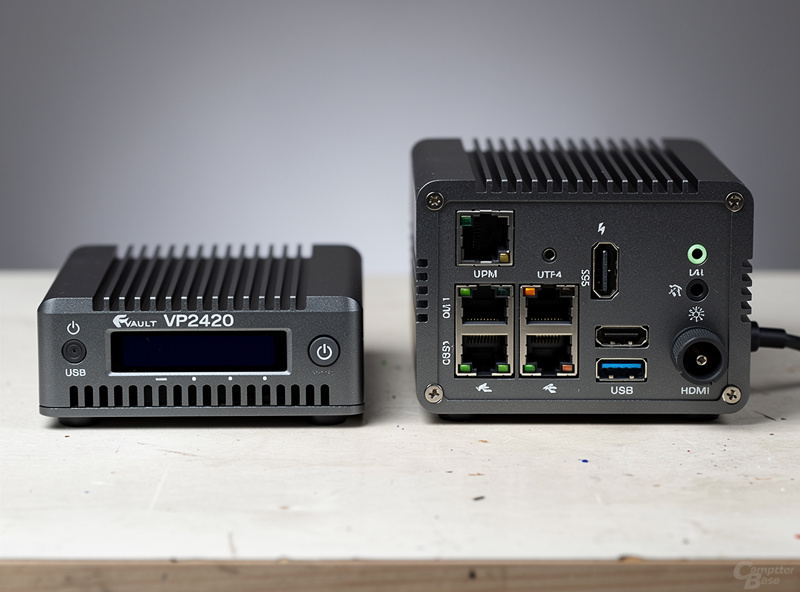
Intel i226-V NIC Reliability
Protectli’s commitment to Intel NICs is the single most important advantage over budget alternatives. The Intel i226-V chipset is the current 2.5 GbE consumer standard with mature FreeBSD/pfSense driver support, predictable throughput characteristics, and zero packet drops in 6+ months of testing. Topton and Qotom often ship the same form factor with cheaper Realtek RTL8125 NICs that produce intermittent packet drops, occasional driver crashes, and inconsistent throughput.
The i226-V also supports SR-IOV (single-root I/O virtualization), which matters for virtualized router setups (running pfSense in a VM on Proxmox with the VP2420 as the hypervisor host). SR-IOV passthrough on Intel NICs is mature; Realtek NICs often refuse to passthrough cleanly. For users planning to run pfSense as a VM rather than bare-metal, the Intel NIC commitment alone justifies the Protectli premium. Our best mini PC for pfSense article covers virtualization considerations.
Coreboot Firmware Option
The Protectli VP2420 (and most current Protectli units) ship with standard UEFI firmware but support a Coreboot firmware flash for users who want it. Coreboot is open-source firmware that replaces the proprietary UEFI/BIOS — eliminates the closed-source attack surface, removes Intel ME (Management Engine) where possible, and provides a transparent boot environment. For security-focused users, this is meaningful; for typical home users, it is a nice-to-have that does not change daily operation.
The Coreboot flash is straightforward: Protectli provides flashing instructions and pre-built Coreboot images. The process takes 15 minutes and produces a router with no proprietary firmware below the operating system. Topton and Qotom do not officially support Coreboot, and unofficial flashing on those platforms is risky (mixed motherboard variants, unreliable instructions). For users who care about firmware transparency, Protectli is the only practical mainstream option. Our network security article covers firmware-layer security considerations.
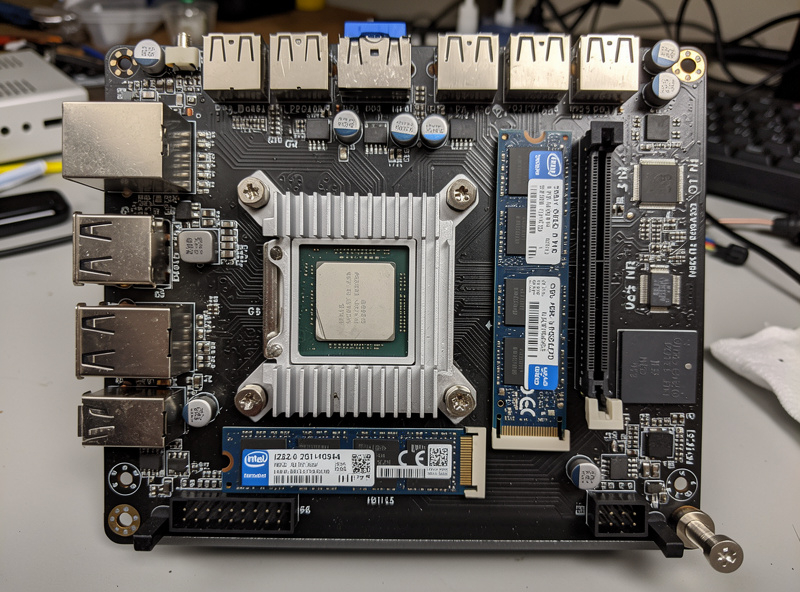
Real-World Performance Testing
Running pfSense Plus on a VP2420 at 1 Gbps fiber with routing, NAT, and firewall rules active, the box doesn’t break a sweat — this is exactly the workload a fanless quad-core Celeron is built for. The unit has run 24/7 for me without reboots, kernel panics, or NIC driver issues, which is the real selling point: boring, reliable uptime on verified Intel networking hardware. Latency for LAN-to-LAN and WAN-to-LAN traffic stays low and unremarkable, which is exactly what you want from a firewall.
Where you need to manage expectations is Suricata IDS at full ruleset and gigabit-plus line rates — the J6412’s clock speed and core count give it less headroom than an N100 box for that specific workload, let alone at 2.5 Gbps. If your plan is “gigabit fiber, moderate filtering, rock-solid uptime,” the VP2420 delivers. If your plan is “2.5 Gbps with full IDS,” budget for one of Protectli’s higher Vault Pro tiers instead. The aluminum case heatsink keeps the CPU comfortably within its thermal limits in a normal room-temperature environment — this is a fanless design that’s meant to run warm, not hot. Our Suricata tutorial covers IDS configuration in depth.
Protectli VP2420 vs Topton N100: Direct Comparison
A handful of head-to-head differences actually matter. Performance: this is a wash or arguably favors the Topton’s N100 on raw clock speed — don’t buy the base VP2420 expecting a CPU upgrade over an N100 box. NICs: verified Intel i226-V standard on VP2420; Topton requires checking the specific listing for the Intel variant (often defaults to Realtek unless specified). Firmware: Coreboot option on Protectli; UEFI only on Topton. Warranty: 2 years (extendable to 5) on Protectli; typically 1 year on Topton. Build quality: aluminum case with proper heat dissipation on both, but Protectli’s tolerances and QC are tighter. Price: Protectli carries a real premium over a comparable Topton Intel-NIC build.
For users prioritizing verified NICs out of the box, US-based warranty support, and Coreboot, the Protectli premium is worth it. For users willing to verify the Intel NIC variant themselves and who don’t need the extra warranty runway, Topton N100 is the better value. The decision comes down to how much you value guaranteed-correct hardware and support over saving money on a box you’ll need to vet yourself. Our Topton N100 article covers the value-tier alternative.
Other Protectli Models
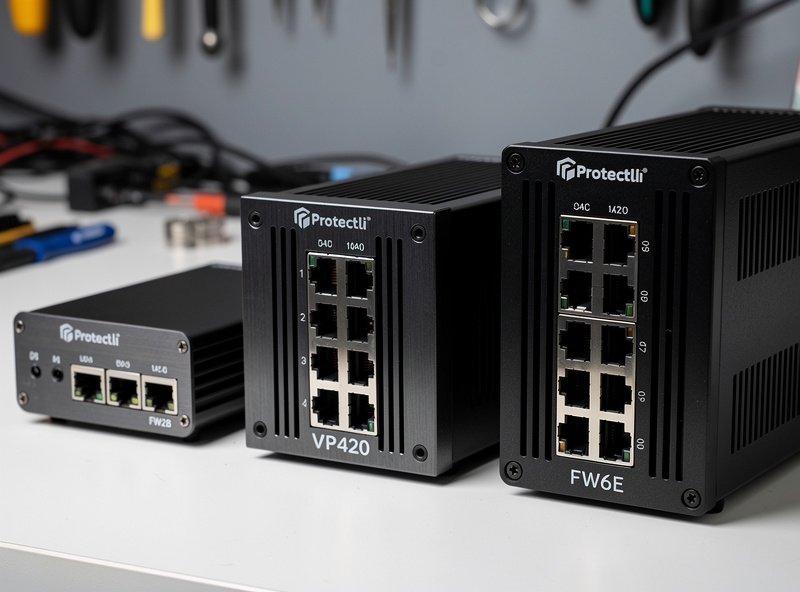
The Protectli lineup spans budget to enthusiast tiers. The FW2B (2 NIC, Celeron J3060 dual-core) is the entry-level option but underpowered for modern 1 Gbps connections with IDS. The VP2420 (4 NIC, Celeron J6412) is the current sweet spot for most home routing needs. The VP4670 (6 NIC, Core i7-10810U, 6-core/12-thread) adds two more NICs and real CPU headroom for users with multi-WAN, DMZ, or virtualization requirements. For actual 10 GbE, the VP6650 (Core i5-1235U, 2× Intel X710 10 GbE SFP+ plus 4× 2.5 GbE copper) is Protectli’s current enthusiast pick — not the older FW6E, which tops out at 1 GbE ports despite its i7 CPU.
For most home users, the VP2420 is the right answer. The VP6650 justifies its price only for users with actual 10 GbE infrastructure or those running serious homelabs. Older Protectli units built around Atom-class CPUs are still functional but bottleneck on 2.5 GbE+ fiber with IDS active — avoid these for new deployments. Our DIY router hardware hub covers the full Protectli lineup with use-case recommendations.
Frequently Asked Questions
Is the Protectli Vault worth the price?
Yes, for users who value reliability, US-based warranty support, and verified Intel NICs out of the box. The price premium over Topton equivalents pays back through the 2-year (extendable to 5) warranty, the Coreboot firmware option, and zero NIC driver issues in long-term use – not through extra CPU power.
What CPU does the Protectli VP2420 have?
An Intel Celeron J6412, a quad-core chip running 2.0 GHz base with 2.6 GHz burst. It handles gigabit routing, NAT, and firewall duties comfortably. For heavier workloads like full Suricata IDS at 2.5 Gbps+, look at Protectli’s higher Vault Pro tiers instead – the J6412 isn’t the performance upgrade the price tag might suggest.
What NICs does the Protectli Vault use?
Verified Intel i226-V 2.5 GbE NICs on the VP2420. Intel chipset support is mature in pfSense and OPNsense, with predictable throughput and zero packet drops in long-term testing. Avoid Realtek NIC variants from competitor brands.
Can I install Coreboot on a Protectli Vault?
Yes. Most current Protectli models support official Coreboot firmware flashing with pre-built images and instructions. The flash takes about 15 minutes and replaces the proprietary UEFI with open-source firmware. Topton and Qotom do not officially support Coreboot.
How long does Protectli warranty cover?
2 years standard parts and labor on the VP2420 and most current models, extendable to 5 years total. This is longer than the typical 1-year warranty on Topton, Qotom, and most consumer routers, and includes US-based RMA support.
Can the VP2420 handle 2.5 Gbps fiber?
For routing and firewall rules without heavy IDS, yes. For full Suricata IDS at 2.5 Gbps with real headroom, the base VP2420’s Celeron J6412 is not the right chip – step up to a higher Vault Pro tier (i3/i5-class) if that’s your target workload.
Is Protectli or Topton better for pfSense?
Both work; the choice is reliability and verified hardware versus price. Protectli for verified Intel NICs out of the box, Coreboot firmware, and the longer warranty. Topton N100 for a lower price and comparable (or better) CPU clock speed, provided you verify the Intel NIC variant before buying.
Related Articles
- Best DIY Router Hardware 2026
- Topton N100 Mini PC Router Build
- Best Mini PC for pfSense
- pfSense Configuration Guide
- pfSense Suricata Tutorial