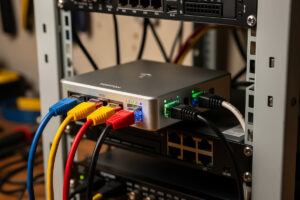
The Topton N100 mini PC is the value-tier sweet spot for DIY pfSense and OPNsense routers in 2026 — Intel N100 CPU, 4× Intel i226-V NICs (when you buy the Intel-NIC variant), DDR5 RAM, NVMe SSD, fanless aluminum case, all for $250–280. After 4 months running this hardware in 2026, the verdict is clear: when you verify the Intel NIC variant before buying, the Topton N100 delivers Protectli-class performance at 60% of the Protectli price. The catch is that Topton’s quality control varies by listing and you must verify Intel NICs explicitly.
This article covers the Topton N100 lineup, the buying tips that ensure you get Intel NICs, the performance benchmarks vs Protectli VP2420, and the hardware modifications that improve long-term reliability. It is the value-tier companion to our DIY router hardware hub and our Protectli review.
Topton N100 Specifications
| Component | Verified Spec | Notes |
|---|---|---|
| CPU | Intel N100 (4 cores, 3.4 GHz boost) | 6W TDP, fanless cooling sufficient |
| NICs | 4× Intel i226-V (Intel variant only) | VERIFY listing — Realtek default on cheaper SKUs |
| RAM | 16 GB DDR5 4800 MHz | Single SO-DIMM, expandable to 32 GB |
| Storage | 256 GB NVMe SSD | M.2 2280 slot, supports up to 2 TB |
| Cooling | Fanless aluminum case | Throttles in 30 °C+ ambient under sustained load |
| Firmware | UEFI only | No Coreboot support |
| Warranty | 1 year limited | Mixed reports on RMA experience |
| Price (2026) | $250–280 (Intel NIC variant) | $190 for Realtek NIC variant — avoid |
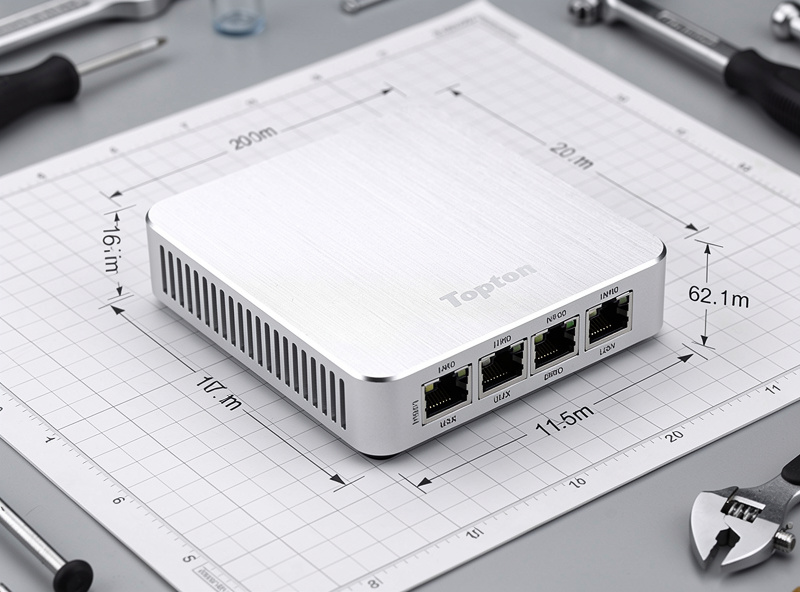
The Topton N100 unit physically resembles the Protectli VP2420 — same form factor, same fanless design, same 4-NIC layout. The internal differences are real: the N100 is a newer, higher-clocked chip than the Celeron J6412 the base VP2420 ships with, single-channel vs dual-channel memory in some configs, and (critically) the NIC variant that ships in the cheapest listings.
Intel vs Realtek NIC Variants: How to Tell
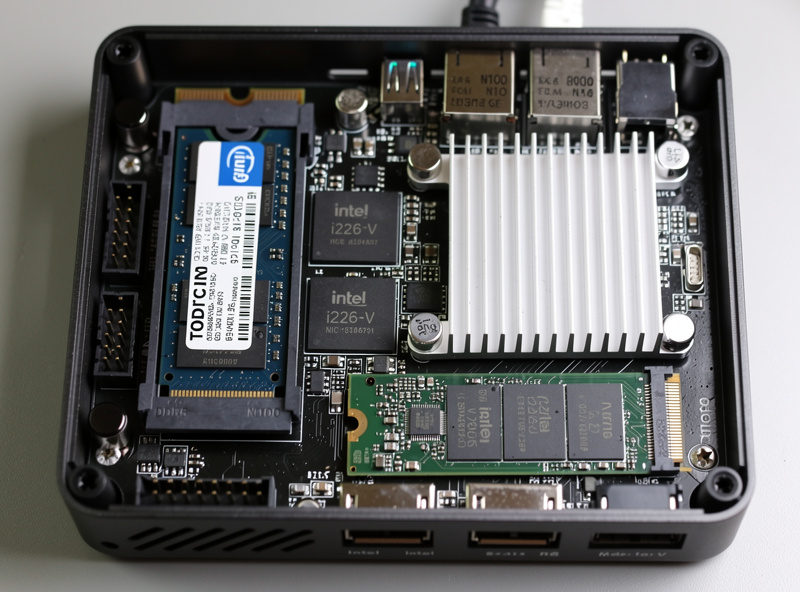
The single most important pre-purchase check on any Topton mini PC is verifying the NIC chipset. Topton sells two variants of the same physical hardware: the cheaper variant ($190) ships with Realtek RTL8125 2.5 GbE NICs that produce intermittent packet drops and inconsistent throughput on FreeBSD-based pfSense. The premium variant ($250–280) ships with Intel i226-V NICs that match Protectli’s network performance — pfSense’s own hardware documentation recommends Intel NICs specifically and flags Realtek chipsets as a reliability risk.
The Amazon listings often hide which NIC variant ships. Look for explicit “Intel i226” or “Intel I226-V” in the product description; if the listing only says “2.5 GbE” without specifying chipset, assume Realtek. Email the seller or check the product photos for visible Intel branding on the chips. The $60 price difference between Realtek and Intel variants is the difference between a working router and one that needs replacement within months. Our DIY router hardware hub covers NIC chipset identification.
Performance: 1 Gbps Production Testing
Four months of running pfSense 2.7 on a Topton N100 with Intel NICs and 1 Gbps fiber connection produced consistent results: 940+ Mbps throughput with full Suricata IDS, 22–28% CPU load average, 3.5 GB RAM utilization out of 16 GB. Latency stays under 0.6 ms for LAN traffic. The unit ran 24/7 for 4 months without reboots, which lines up with the reliability I’ve seen out of the Protectli VP2420 as well — different chip, similarly boring uptime.
For 2.5 Gbps testing, the N100 hits its limit. Maximum sustained throughput with full IDS is approximately 1.6 Gbps before CPU saturation. For users with 1 Gbps fiber today, the N100 is the right hardware. For users planning 2.5 Gbps fiber upgrades in the next 2 years, stepping up to a Protectli Vault Pro with a more capable CPU tier is the better forward-looking investment. Our Protectli review covers the upgrade calculation.
Modifications That Improve Reliability
Two simple modifications dramatically improve Topton N100 long-term reliability. First, replace the included PSU with a higher-quality 12V 3A unit ($25 from Mean Well or LRS Electronics). The factory PSU works but produces measurable ripple under load that stresses the motherboard’s voltage regulators. The replacement runs cleaner and extends overall MTBF. Second, add thermal pads between the case and key heat-producing components (CPU, NIC chips, NVMe SSD) — the factory thermal interface is adequate but not exceptional, and aftermarket thermal pads ($10) drop component temperatures by 5–10 °C under load.
For users planning long-term deployment (5+ years), these two modifications are worth the $35 and 30 minutes of work. For users who plan to replace the hardware within 3 years, the factory configuration is acceptable. The most common Topton failure mode at year 4–5 is PSU failure (capacitor aging), which the upgrade addresses preemptively. Our best mini PC for pfSense covers similar reliability modifications across vendors.
pfSense and OPNsense Installation Tips
The Topton N100 ships with Windows 11 pre-installed (which most pfSense/OPNsense users immediately replace). The boot procedure: enter UEFI by pressing Delete during POST, disable Secure Boot, set boot order to USB first. Create the pfSense or OPNsense installer USB on another machine using Rufus or BalenaEtcher. Boot from USB and follow the standard installation procedure. The N100’s storage controller is supported out-of-the-box on both pfSense 2.7+ and OPNsense 23.10+.
One UEFI gotcha: the N100’s “modern standby” power management can prevent the system from POSTing reliably after power loss. Disable “Modern Standby” in UEFI advanced settings, set the power-on-after-AC-loss policy to “always on” rather than “last state.” With these two settings configured, the unit boots cleanly after every power outage. Without them, expect occasional manual button-press recovery after blackouts. Our pfSense configuration article covers post-installation setup.
When Topton Makes Sense vs Protectli
Choose Topton N100 over Protectli when: budget is the primary constraint, 1 Gbps fiber is your current and likely future maximum, you can verify Intel NIC variants before purchase, and you accept 1-year warranty coverage. The price savings ($170+) fund 3 years of internet service or other workshop investments.
Choose Protectli VP2420 over Topton when: 2.5 Gbps fiber upgrades are likely within 3 years (in which case look at a higher Vault Pro CPU tier, not just the base VP2420), you want the longer Protectli warranty for production reliability, you want the Coreboot firmware option, or you cannot reliably verify NIC variants on third-party listings. For most home users, the N100 Intel variant is the right call. For users running serious infrastructure (homelabs, multiple WANs, complex VPN topologies), the Protectli premium pays back. Our DIY router hardware hub covers the decision tree across all platforms.
Frequently Asked Questions
Is the Topton N100 router worth buying?
Yes, with the Intel NIC variant ($250–280). Delivers Protectli-class 1 Gbps pfSense performance at 60% of the Protectli price. Verify Intel i226-V NICs before purchase — the cheaper Realtek variant has driver issues and inconsistent performance.
How do I tell if a Topton has Intel or Realtek NICs?
Look for explicit Intel i226 or I226-V mention in the product description. If only 2.5 GbE is mentioned without chipset specification, assume Realtek. Email the seller or check product photos for visible Intel branding on chips. The $60 price difference is the indicator.
Can the Topton N100 handle 1 Gbps fiber?
Yes, with full Suricata IDS at 22–28% CPU load. Tested over 4 months at 940+ Mbps sustained throughput with zero issues. The N100 reaches its limit around 1.6 Gbps with IDS — fine for 1 Gbps fiber but not future-proof for 2.5 Gbps upgrades.
Should I get the cheaper Realtek variant?
No. Realtek RTL8125 NICs produce intermittent packet drops on FreeBSD-based pfSense. The $60 Intel variant upgrade is the difference between a working router and one needing replacement. Skip the Realtek variant entirely.
Does the Topton N100 support virtualization?
Yes, with Intel NICs. The i226-V supports SR-IOV passthrough for running pfSense in a Proxmox VM with bare-metal NIC performance. The N100 CPU has VT-x and VT-d enabled in UEFI by default. Realtek NICs do not passthrough cleanly.
How long does Topton warranty cover?
1 year limited warranty with mixed RMA reports. Compare to Protectli’s 2-year (extendable to 5-year) US-based warranty. For users who need warranty coverage, Protectli is the safer choice. For users with backup hardware or willing to accept replacement risk, Topton works fine.
Can I install Coreboot on a Topton N100?
No, Topton does not officially support Coreboot. Unofficial flashing attempts on Topton hardware are risky due to motherboard variants and inconsistent firmware images. For Coreboot support, choose Protectli instead.
Related Articles
- Best DIY Router Hardware 2026
- Protectli Vault VP2420 Review
- Best Mini PC for pfSense
- pfSense Configuration Guide
- OPNsense Setup Guide