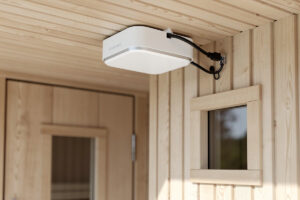
An IP65-rated Wi-Fi access point mounted on the ceiling outside a sauna door delivers a stable signal through a wooden sauna wall at 2.4 GHz.
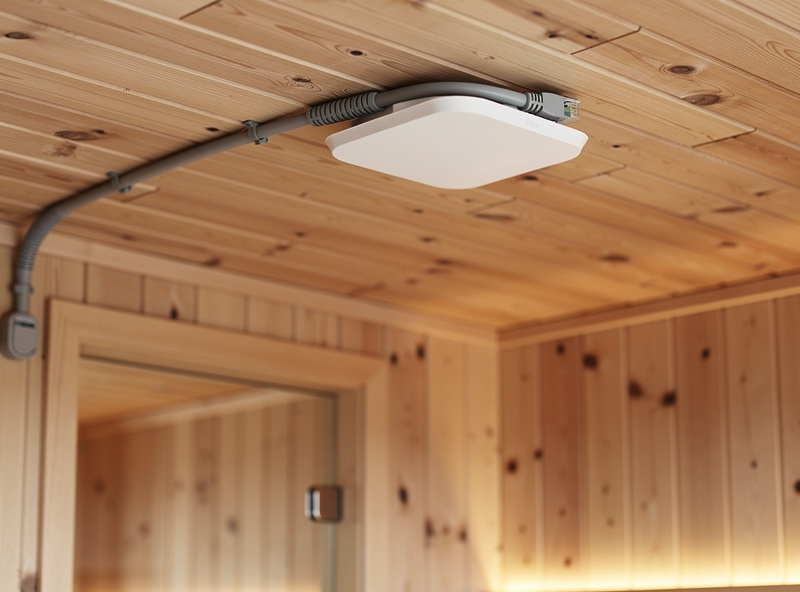
In my setup, the wet-room AP is a UniFi U6 Mesh mounted on the hallway ceiling outside the sauna door — the PoE cable runs through a drip loop before it enters the RJ45 port. The Wi-Fi 6 Mesh Smart Home covers the foundational networking this article depends on. The access point mounted inside the sauna cabin also experiences roughly 8 dB of attenuation. The same access point mounted inside the sauna cabin fails within six months because the internal temperature crosses 60 degrees Celsius during a session, the solder joints on the RF amplifier crack from thermal cycling, and the condensation from the post-session cooldown shorts the PoE circuit. The fix is not a more expensive access point. The fix is understanding where the wet-room boundary actually is and placing the AP on the correct side of it.
A sauna or cold-plunge room is not a network problem. It is a physics problem with a networking answer. The heat, the humidity, and the condensation do not care about your Wi-Fi 6 specs. They care about the IP rating of the enclosure, the thermal limits of the electronics, and whether the access point’s mounting location stays below its rated operating temperature for the entire session cycle. Get the placement and the enclosure rating right once, and the Wi-Fi works for years. Get either one wrong, and you replace the access point every six months.
IP Ratings: What IP65 Actually Means in a Sauna Context
An IP rating consists of two digits: the first for solid-particle protection and the second for liquid-ingress protection. IP65 means the enclosure is dust-tight — digit 6, the highest rating — and protected against water jets from any direction — digit 5, meaning a 6.3-millimeter nozzle at 12.5 liters per minute from 3 meters distance for at least 3 minutes causes no harmful ingress, per the IEC 60529 test standard the rating is defined under (IP code reference). That is sufficient for a sauna-adjacent area where the only moisture source is ambient humidity and the occasional splash from a cold-plunge tub. It is not sufficient for inside the sauna cabin, where temperatures reach 60 to 80 degrees Celsius during a session and the cooldown phase produces condensation on every surface including the inside of the access point enclosure.
IP67 — dust-tight and protected against temporary immersion in water up to 1 meter for 30 minutes — handles the condensation from a sauna cooldown cycle but still does not solve the thermal problem. The electronics inside an IP67 enclosure run hotter than the same electronics in open air because the sealed enclosure traps the heat the chipset generates. The ambient temperature inside the sauna-adjacent area — typically 25 to 35 degrees — plus the self-heating of the access point’s chipset pushes the internal enclosure temperature into the 50-degree range, which is the upper limit of most consumer and small-business access-point specifications. An outdoor-rated AP with an operating-temperature spec of -30 to +70 degrees Celsius survives where an indoor AP rated for 0 to +40 fails, and the outdoor-rated AP costs roughly $30 more and lasts years instead of months.
Placement: The Wall Between the AP and the Steam
The ideal mounting location for a sauna-area access point is on the ceiling of the hallway or changing area outside the sauna door, with one wooden wall between the AP and the sauna interior. A standard 40-millimeter cedar or spruce sauna wall attenuates a 2.4 GHz Wi-Fi signal by roughly 6 to 8 dB, which reduces the signal strength inside the sauna by about half but is still more than adequate for streaming audio or controlling a sauna-temperature app. A 5 GHz signal attenuates by 12 to 15 dB through the same wall, losing roughly 75 percent of its signal strength, which is why 2.4 GHz is the correct band for sauna-area coverage — lower frequency, better penetration, adequate throughput for the low-bandwidth applications that run in a sauna.
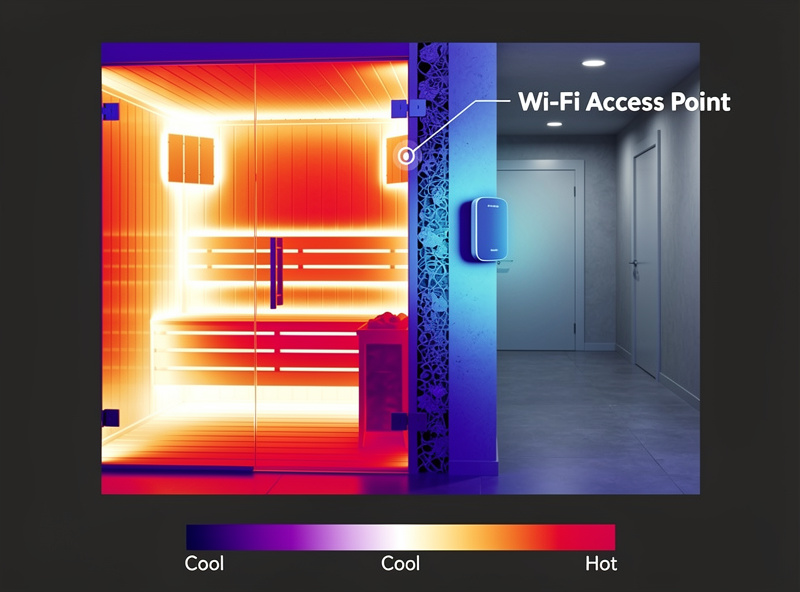
Mounting the AP inside the sauna cabin is the mistake that kills hardware. Even if the AP is rated for the temperature — and most are not — the thermal cycling from 25 to 65 degrees Celsius four times per day causes the solder joints on the RF power amplifier and the Ethernet transformer to crack through differential expansion. The failure mode is intermittent at first: the AP drops offline for five minutes mid-session, reconnects, drops again. Then it stops connecting altogether. The fix is moving the AP to the other side of the wall and accepting the 6 dB of signal loss as the cost of hardware survival. For the broader networking logic that keeps wellness devices isolated from the rest of the home network, including why a sauna should live on its own VLAN, the smart sauna networking guide covers the VLAN architecture and firewall rules that segment wellness traffic from the rest of the network.
Cold Plunge Areas: The Condensation Problem
A cold-plunge tub at 10 degrees Celsius in a 25-degree room condenses water on every surface within a meter of the water line — the tub exterior, the floor, the wall behind the tub, and any electronics mounted nearby. The condensation is not a splash risk. It is a sustained-humidity risk: 90 to 100 percent relative humidity in the immediate vicinity of the tub for hours after a session. An access point mounted on the wall directly above a cold plunge tub condenses water on its internal PCB within a month, and the resulting corrosion bridges traces on the board that were never designed to carry current. The AP shorts out silently — no pop, no smoke, just a dead Ethernet port on the switch and a $150 replacement bill.
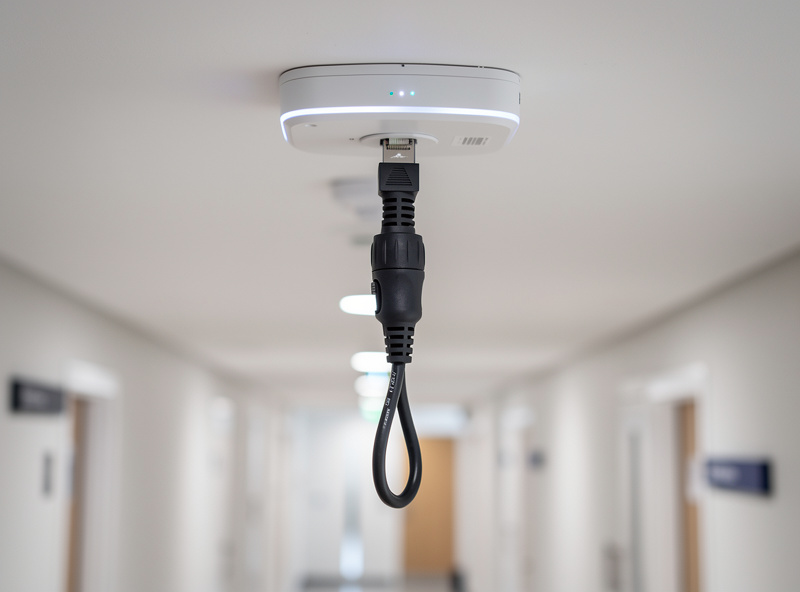
The solution is distance. Mount the AP at least 2 meters horizontally from the tub and above the condensation zone — ceiling-mounted with the ports facing down so condensation drips away from the RJ45 connector rather than pooling inside it. A drip loop on the Ethernet cable — a U-bend that dips below the AP before rising to the connector — catches condensation running down the cable jacket and drips it onto the floor instead of into the Ethernet port. The drip loop costs zero dollars and saves the access point from the most common wet-room failure mode. A PoE-powered AP eliminates the need for an electrical outlet near the wet area, and a weatherproof RJ45 connector boot — a $2 silicone sleeve that seals the plug-to-jack interface — prevents the condensation that the drip loop misses from wicking into the connector pins.
Access Point Selection: What to Buy for Wet-Room Duty
Two access points cover the wet-room use case at two price points. The UniFi U6 Mesh at $179 is IPX5-rated — protected against water jets, not immersion — with an operating-temperature range of -30 to +60 degrees Celsius and a compact form factor that mounts on a single screw on the ceiling. It runs on PoE, supports 2.4 and 5 GHz with Wi-Fi 6, and has been widely deployed in outdoor and semi-outdoor residential installations with proven humidity survival. The TP-Link EAP225-Outdoor at $69 is IP65-rated — dust-tight and jet-protected — with passive PoE and an operating range of -30 to +65 degrees. It lacks Wi-Fi 6 but delivers stable 2.4 GHz coverage for the sauna use case at less than half the price. Both survive wet-room duty if mounted outside the sauna cabin on the correct side of the wall.
What not to buy: any indoor-only access point with an operating-temperature ceiling below 50 degrees Celsius, any mesh node that relies on a wall-wart power supply (outlets in wet rooms require GFCI protection and the wall-wart blocks the adjacent outlet), and any access point that does not support standalone mode without a cloud controller. The sauna-area AP must work when the internet is down, when the controller is offline, and when the only thing that matters is whether the temperature-monitoring app still connects to the sensor inside the sauna. Standalone mode is non-negotiable for safety-related monitoring.
Frequently Asked Questions
Can I put a Wi-Fi access point inside my sauna?
No. Sauna interior temperatures reach 60 to 80 degrees Celsius during a session, exceeding the operating-temperature ceiling of all consumer and most outdoor-rated access points. The thermal cycling from session heat to cooldown condensation cracks solder joints within months. Mount the AP outside the sauna on the adjacent wall and accept the 6 to 8 dB of signal loss through the wooden wall.
What IP rating does my sauna-area access point need?
IP65 minimum for areas adjacent to saunas and cold plunges — dust-tight and protected against water jets. IP67 adds immersion protection and is recommended if the AP is mounted near a cold plunge where splashing is possible. IPX4-rated units marketed as outdoor-capable are not sufficient for sustained high-humidity environments.
Why does my sauna Wi-Fi work at 2.4 GHz but not at 5 GHz?
5 GHz signals attenuate by 12 to 15 dB through a standard wooden sauna wall, losing roughly 75 percent of signal strength. 2.4 GHz attenuates by only 6 to 8 dB through the same wall. The sauna use case — streaming audio, smart-home control — needs less than 5 Mbps, which 2.4 GHz delivers reliably through one wall.
How do I prevent condensation from killing my access point?
Mount the AP at least 2 meters from any cold plunge tub, ceiling-mounted with ports facing down. Install a drip loop on the Ethernet cable — a U-bend that dips below the AP before rising. Use a weatherproof RJ45 connector boot. Power the AP via PoE to eliminate the need for an electrical outlet near the wet area.
Do I need a separate VLAN for sauna and cold plunge devices?
Yes. Sauna temperature sensors, cold-plunge chiller controllers, and wellness-tracking apps should live on their own VLAN isolated from the main home network. A compromised IoT temperature sensor should not have a route to your NAS. The segmentation follows the same logic as any other IoT VLAN.
Can a mesh Wi-Fi node survive in a sauna-adjacent bathroom?
A mesh node rated IP65 or higher with an operating temperature ceiling above 50 degrees Celsius can survive in a sauna-adjacent bathroom if mounted outside the steam zone. Mesh nodes that use wall-wart power supplies need a GFCI-protected outlet and the power brick must be rated for damp-location use. PoE-powered mesh nodes avoid the outlet problem entirely.
Related Articles
- Farm IoT Network Setup
- pfSense Firewall Rules: Beginner Setup Guide
- Home Network VLAN Guide: Segmenting Your Network
- Best DIY Router Hardware: Home and Homelab Picks
- OPNsense Setup Guide: Complete Walkthrough